

Table of Contents
- Why Printable Budget Templates Still Work in 2026
- Quick Comparison: Best Printable Budget Templates
- 1. Simple Money Studio Starter Pack: Best All-in-One Printable System
- 2. 1-Hour Budget Setup Guide: Best Simple Monthly Budget Worksheet for Beginners
- 3. Money & Bills Organizer: Best for Household Budget Tracking
- 4. Debt & Savings Tracker: Best Printable Debt Payoff Tracker
- 5. Subscription Cleanup Planner: Best for Freeing Up Extra Money
- How to Start a Budget for Beginners Using Printable Templates
- Frequently Asked Questions
Last Updated: September 30, 2026
Why Printable Budget Templates Still Work in 2026
Financial apps promise to fix your money in one download, but most people abandon them within weeks. That is why the best printable budget templates 2026 have a real advantage: a pen and paper you see every day beats an app you forget to open.

The Behavioral Case for Paper
Budgeting fails for behavioral reasons more often than mathematical ones: people discount future rewards, avoid unpleasant information, and overestimate what they will do later. Print pushes back on all three.
- Friction works in your favor. Handwriting a number forces a moment of attention auto-imported transactions skip.
- Visibility beats notification. A page on the fridge is ambient; a push notification is momentary and easy to swipe away.
- Completion feels like progress. Filling in a box gives a visible reward a spreadsheet cell rarely provides.
- No dashboard theater. Apps can show a beautiful chart without changing a single decision. A printed worksheet only exists if you fill it in.
Where Print Beats Digital, and Where It Loses
Print is not universally better. It wins some jobs and loses badly in others.
Print wins when:
- You need daily visibility in a shared space, like a kitchen or home office.
- You want to budget with a partner or family member without sharing a login.
- You are trying to break a spending habit and want the act of recording to feel deliberate.
- You want zero subscription cost and no data leaving your home.
Print loses when:
- You have dozens of transactions a week and need automatic categorization.
- You want running totals that update as you type.
- You need to reconcile against live bank balances daily.
- You manage multiple accounts, cards, or side businesses with overlapping cash flow.
The Static-Data Problem, and How to Bridge It
A printable template cannot see your bank account, which is why so many get abandoned by month three: the numbers on the page drift from reality. You do not need banking integration to fix this, just a reconciliation routine.
- Pick one anchor day per week. A five-minute check-in comparing printed totals to real balances.
- Write the difference, do not hide it. If the page says $200 left in groceries and the account says $140, write $140. The gap is the lesson.
- Use a monthly reset, not a daily sync. Printable systems work on a monthly cycle.
- Keep volatile categories digital. Track daily-changing categories in a spreadsheet and transfer the weekly total to the page.
- Export statements, do not retype them. Download a CSV or PDF from your bank to build monthly totals.
Print Sustainably Without Losing the Habit
A printable system reprinted every month has a real paper and ink cost. A few habits keep it cheap and low-waste.
- Print one master copy and slip it into a sheet protector. Fill it with a dry-erase marker and wipe it clean each month.
- Use grayscale and draft mode for working copies; reserve color for pages where it carries meaning.
- Print double-sided where the layout allows, and set the scale to fit the page.
- Choose layouts with generous white space. Ink-heavy designs cost far more to reprint than clean line-based worksheets.
- Recycle spent pages and keep one binder for the current year to review past months without reprinting.
What to Look for in Any Printable Template
Before you download anything, run it through this checklist. It separates a template you will use for years from one you will abandon in a month.
- Clear category labels with room to write, not just empty boxes.
- A weekly check-in section, not just a monthly total. Weekly rhythm prevents late fees and overspending.
- Space for irregular and annual expenses, so a car registration or insurance premium does not blow up the month.
- A debt or savings progress element, because visible progress keeps the routine alive.
- Readable type and high contrast, so the page works in grayscale and for low-vision readers.
- A file format that matches how you work, whether a print-first PDF or a fillable spreadsheet.
Quick Comparison: Best Printable Budget Templates
Here is how the five printable budget templates compare at a glance. Prices reflect Simple Money Studio's current one-time purchase rates.
| Template | Price | Best For | Standout Feature |
|---|---|---|---|
| Starter Pack | $47.96 | All-in-one system | Four workbooks, one routine |
| 1-Hour Budget Setup Guide | $18.99 | Beginners | Four-bucket framework |
| Money & Bills Organizer | $16.99 | Households | 5-minute weekly check-in |
| Debt & Savings Tracker | $16.99 | Debt payoff | Snowball vs. avalanche planner |
| Subscription Cleanup Planner | $14.99 | Freeing up cash | Keep/reduce/pause/cancel rules |
1. Simple Money Studio Starter Pack: Best All-in-One Printable System
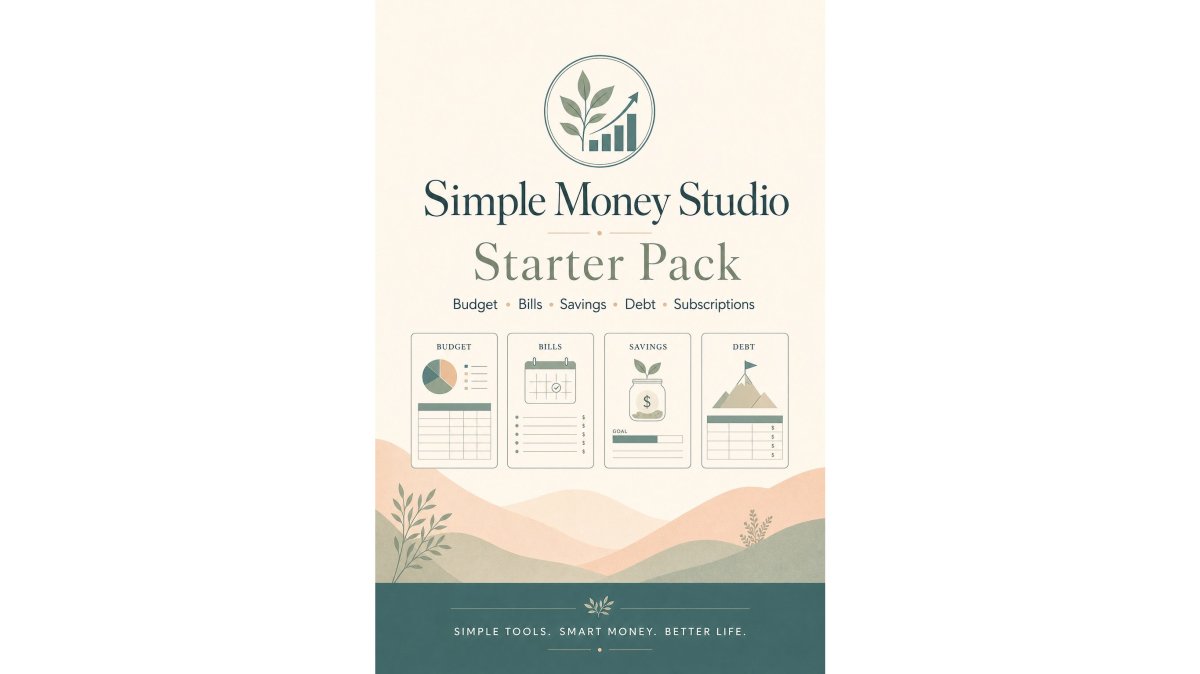
Our top pick is the Starter Pack because it covers the whole money picture instead of one slice. For $47.96 you get four printable PDF workbooks, a $20 savings over buying each separately.

What's Inside the Starter Pack
The four workbooks each have a clear job:
- 1-Hour Budget Setup Guide builds a monthly budget in about an hour using four simple buckets.
- Money & Bills Organizer tracks income, bills due, bills paid, and bills still due.
- Debt & Savings Tracker turns savings and debt goals into visible progress.
- Subscription Cleanup Planner finds recurring charges and tracks what you save.
Together they form one routine: set up the budget, run the month, track progress, free up extra money.

Pros and Cons
Pros: Everything speaks the same language, so you are not learning four systems. Pages are reusable month after month, and each workbook works alone if you start small.
2. 1-Hour Budget Setup Guide: Best Simple Monthly Budget Worksheet for Beginners
If you have never made a budget, start here. The 1-Hour Budget Setup Guide is a simple monthly budget worksheet that walks you through four steps in roughly an hour, built for people overwhelmed by complicated money systems.
How the Four-Bucket Framework Works
The guide skips dozens of categories and uses four buckets: income, bills and fixed expenses, weekly spending, and savings and debt. The hour breaks down cleanly:
- 10 minutes to gather numbers
- 15 minutes to list income
- 15 minutes to list bills and fixed expenses
- 10 minutes to estimate essential and weekly spending
- 10 minutes to assign savings and debt amounts
Pros and Cons
Pros: Fast, beginner-friendly, and realistic about weekly spending. The conversion chart handles weekly and biweekly pay.
3. Money & Bills Organizer: Best for Household Budget Tracking
Households with shared bills need one place to look. The Money & Bills Organizer tracks total income, bills due, bills paid, and bills still due on a single monthly view, plus a bill calendar, payment log, annual bills page, and subscription list.
Pros and Cons
Pros: Ideal for messy, shared finances with multiple income sources. The weekly routine is short enough to keep.
Simple Money Studio: Starter Pack →
4. Debt & Savings Tracker: Best Printable Debt Payoff Tracker
Debt feels hopeless when you cannot see progress. The Debt & Savings Tracker is a printable debt payoff tracker that makes every payment visible with fill-in progress bars. Set savings targets, choose a strategy, and update balances monthly.
Snowball vs. Avalanche: Which Strategy Fits You
Two approaches dominate debt payoff, and the tracker walks you through both:
- Debt snowball: focus extra money on the smallest balance first for quick wins.
- Debt avalanche: focus extra money on the highest interest rate first to save more over time.
Pros and Cons
Pros: Progress bars and monthly check-ins keep momentum going, even when balances move slowly. Quarterly summaries show the bigger picture.
5. Subscription Cleanup Planner: Best for Freeing Up Extra Money
Recurring charges creep up quietly. The Subscription Cleanup Planner gathers every subscription in one place, then applies simple rules: cancel, pause, reduce, or keep. Guiding questions include "Have I used this in the last 30 days?" and "Would I sign up again today at this price?"
Pros and Cons
Pros: Action-oriented and non-judgmental. It targets real savings without cutting everything you enjoy.
How to Start a Budget for Beginners Using Printable Templates
Starting a budget is simpler than most people expect. Follow these steps and you will have a working system in about a week.
- Pick your format. Choose digital PDF or printed pages based on how you check in. Printed sheets on a visible surface get used more.
- Gather 30 to 60 days of transactions. Your bank and card statements hold the real numbers.
- Build the budget first. Use a simple monthly budget worksheet to list income, bills, and weekly spending.
- Add a tracking routine. A weekly five-minute check-in keeps bills from slipping.
- Track debt and savings monthly. Update balances monthly and review quarterly.
- Audit subscriptions once a year. Do shorter monthly checks for renewals and trial end dates.
Choose Your Template by Financial Personality, Not by Popularity
Most template roundups tell you which file to download, rarely which fits how you behave with money. Use this framework before you print anything.
- The Avoider (you dread opening statements): start with the 1-Hour Budget Setup Guide. Its four-bucket framework limits decisions, lowering the odds you quit in week two.
- The Optimizer (you track spending but want precision): skip the beginner worksheet and go to the Debt & Savings Tracker paired with a monthly budget sheet. You need payoff math, not category basics.
- The Household CFO (you manage shared bills): the Money & Bills Organizer is the anchor. Its bill calendar and payment log handle coordination a single-person worksheet ignores.
- The Leak-Plugger (income is fine but money disappears): start with the Subscription Cleanup Planner, then move to a budget worksheet once recurring charges are under control.
- The Systems Person (you want one routine, not four): the Starter Pack bundles all four workbooks so pages share the same categories and language.
Match the Template to Your Life Stage
Financial personality is one axis. Life stage is the other, and it changes which pages you need.
- Students and early earners: prioritize a monthly budget worksheet with a weekly-spending column. Irregular income is easier to plan by pay period than by calendar month.
- Dual-income households: look for multiple income lines and a shared bill calendar. A single-income worksheet crams two paychecks into one column, hiding cash-flow gaps.
- Variable or self-employed income: budget on your lowest expected month, then treat above-average months as surplus to savings or debt. Fixed-category templates break here.
- Debt payoff mode: pair a budget worksheet with a dedicated payoff tracker. The worksheet controls cash flow; the tracker controls payoff order.
- Pre-retirement and fixed income: favor templates with an annual bills page and quarterly review, since large irregular expenses matter more than weekly spending.
Choose the Right File Format
Format matters as much as layout, because the wrong file type is why most printables get abandoned.
- PDF (print-first): best for handwriting, fridge visibility, and screen-free routines. Look for fillable fields if you want to type before printing, and check it is not locked against reduced-scale printing.
- Spreadsheet (Excel or Google Sheets): best if you want formulas to total categories automatically. Sheets wins for shared access; Excel wins for offline work and heavier formulas.
- Hybrid: print the monthly budget page for daily visibility and keep the debt tracker in a spreadsheet where running totals matter. Most consistent budgeters land here.
Print Settings That Save Money and Ink
A printable system only works if reprinting stays cheap.
- Print in grayscale unless color carries meaning.
- Use draft or toner-saver mode for working copies; reserve high quality for the master.
- Print double-sided where the layout allows, and keep a master copy in a sheet protector so you can refill it with a dry-erase marker instead of reprinting.
- Set the print scale to fit to page so category boxes are not cut off.
Make Your Templates Accessible
Most printable budget templates are designed for sighted users with a standard inkjet printer. If you have low vision, a print disability, or use a screen reader, that default creates real barriers. A few adjustments fix most of them.
- Contrast: choose dark text on a light background. Light gray gridlines and pastel headers look clean on screen but disappear on paper.
- Font size: look for at least 12-point body text. If category labels are smaller, print at 110 to 125 percent scale.
- Screen-reader compatibility: a scanned or image-based PDF cannot be read aloud. Choose a true text or tagged PDF, or the spreadsheet version, which assistive technology reads more reliably.
- Fillable fields: tagged form fields let you complete the budget on screen with a keyboard instead of a pen.
- Color independence: if color signals categories, check they are also labeled in text. Color-only coding fails for color-blind users and in grayscale.
- Paper and binding: high-contrast, uncoated paper takes pen and marker better than glossy stock, and a binder keeps pages from getting lost between months.
Pick your template in this order: financial personality first, life stage second, file format third. Then check accessibility basics before printing a full month of pages. A template that fits how you behave and how you read will outlast any app you forget to open.
Frequently Asked Questions
Are printable budget templates better than budgeting apps?
Printable budget templates work well for people who feel overwhelmed by apps and prefer a hands-on approach. Writing numbers by hand makes spending decisions more tangible. Templates also never crash, do not require subscriptions, and can be customized with a pen. Apps offer automation and real-time syncing, which suits some users. The best choice depends on whether you prefer manual tracking or digital convenience. Many people use printable templates for monthly planning and an app for quick balance checks.
What is the best printable budget template for someone just starting out?
The 1-Hour Budget Setup Guide from Simple Money Studio is designed for complete beginners. It walks you through four simple buckets: income, bills and fixed expenses, weekly spending, and savings and debt. The guide includes a step-by-step time breakdown so you can build a working budget in about an hour. It also provides examples for converting weekly or biweekly pay into monthly income, which helps new budgeters avoid common mistakes.
Can a printable debt payoff tracker really help me stay motivated?
Yes. The Debt & Savings Tracker turns your progress into something visible. You fill in progress bars for each debt and savings goal, which makes even small payments feel like real movement. The tracker also includes monthly and quarterly check-ins so you can see how much you have paid off over time. Choosing a payoff strategy like snowball or avalanche gives you a clear plan instead of guessing. Seeing progress on paper often keeps people more consistent than digital reminders.
How do I customize a printable budget template for my family's finances?
Start by listing all income sources, including side gigs and shared contributions. Then list every fixed bill and variable expense your household has. Use the template's blank rows or a custom tracker page, like the one in the Money & Bills Organizer, to add categories specific to your family, such as childcare or school fees. If multiple people share bills, print extra copies of the bill calendar and payment log so everyone can see what is due and what has been paid.
What if I have irregular income? Will printable templates still work?
Printable templates work for irregular income if you plan around your lowest expected month. Start by estimating your minimum monthly income, then list only essential bills against that number. Use the 1-Hour Budget Setup Guide's income conversion chart to average variable pay over three to six months. For side gigs, track each payment on the Income Snapshot page in the Money & Bills Organizer. When extra money arrives, assign it to savings or debt using your tracker.
Building a budget you actually stick with is the hard part, and complicated systems are usually why people quit. Simple Money Studio makes it easier with beginner-friendly, printable tools that turn money overwhelm into a clear routine. Start with the 1-Hour Budget Setup Guide, add the Debt & Savings Tracker for visible progress, and use the Subscription Cleanup Planner to free up extra money. Get started with Simple Money Studio and build a simple system you can keep month after month.