

Table of Contents
- Why Your Current Bill Tracking Method Is Failing You
- The 4-Bucket System: The Best Way to Track Monthly Bills
- How to Automate Monthly Bill Payments (Without Losing Control)
- Budgeting for Irregular Monthly Bills and Variable Income
- Manual vs. Automated Tracking: Which Actually Works?
- Using a Monthly Bill Organizer Printable to Stay Consistent
- Overcoming the Mental Block of Bill Tracking
- Conclusion
- Frequently Asked Questions
Last Updated: September 28, 2026
Why Your Current Bill Tracking Method Is Failing You
The best way to track monthly bills is a four-bucket system that separates income, fixed bills, weekly spending, and savings into one routine you check weekly. Most people fail because their method asks too much of them.
The 4-Bucket System: The Best Way to Track Monthly Bills
The 4-bucket system sorts every dollar into four categories: Income, Bills and Fixed Expenses, Weekly Spending, and Savings and Debt, replacing dozens of confusing budget categories with four clear buckets.
Bucket 1: Income
Determine your monthly net income, what actually lands in your account after taxes and deductions. If you're paid biweekly, multiply one paycheck by 26, then divide by 12. For side income, average the last three months.
Bucket 2: Bills and Fixed Expenses
This bucket holds everything with a due date and predictable amount: rent, utilities, insurance, loan payments, phone, and subscriptions. List each with its amount, due date, and payment method so you see your total bills due in one glance, one list, one place.
Bucket 3: Weekly Spending
Weekly spending covers variable expenses: groceries, gas, household basics, prescriptions, pet supplies. Estimate from recent bank statements, then divide your monthly amount by four, that's your weekly ceiling and a checkpoint every seven days.
Bucket 4: Savings and Debt
Whatever remains after Buckets 1 through 3 goes here. Split it between an emergency fund and debt repayment, or focus it on one goal if that keeps you motivated.
| Bucket | What Goes In | How Often You Check |
|---|---|---|
| Income | Paychecks, side income, refunds | Start of month |
| Bills and Fixed Expenses | Rent, utilities, insurance, loans | Weekly |
| Weekly Spending | Groceries, gas, household basics | Weekly |
| Savings and Debt | Emergency fund, debt payoff | Monthly |
How to Automate Monthly Bill Payments (Without Losing Control)
The fix is pairing automation with a review habit:
- Set auto-pay only for fixed, predictable bills
- Keep variable bills manual so you see the amount each month
- Check your account statements weekly, not just at month end
- Verify every auto-payment actually cleared
- Review your subscription list quarterly
A weekly check-in makes this work: open your organizer, confirm what paid, look at what's due in the next seven days, note one action item if needed, then close it.
Budgeting for Irregular Monthly Bills and Variable Income
Standard budgeting advice assumes a paycheck lands every two weeks and bills arrive on the same schedule. If you're a freelancer, gig worker, commission earner, or seasonal employee, that advice sets you up to overspend in a strong month and panic in a weak one.
Build Your Baseline From Your Lowest Month, Not Your Average
Averages lie when income swings. If you earned $2,000, $5,000, and $3,000 over three months, your average is $3,333, but two of those months came in under it. Budget on the lowest recent month instead. Anything above that baseline becomes bonus money you assign on purpose: savings, debt, or a buffer for the next slow stretch.
Separate Fixed Bills From Variable Bills, and Fund Them Differently
| Bill Type | Examples | How to Fund It |
|---|---|---|
| Fixed monthly | Rent, loan payments, phone | Pay from your baseline income |
| Variable monthly | Utilities, credit cards, gas | Estimate from a 3-month average, review monthly |
| Annual or seasonal | Car insurance, property tax, registration | Divide by 12, set aside monthly |
| Irregular | Medical, car repair, gifts | Build a small "sinking fund" buffer |
A sinking fund is a named savings bucket for a known future expense. Set aside a fixed amount monthly, and when the bill hits, the money is already there, turning a spike into a normal expense.
The Two-Account Method for Irregular Income
Many freelancers and gig workers keep two accounts, one for bills, one for spending.
- When money arrives, move your baseline amount into the bills account first.
- Pay all fixed and variable bills from that account.
- Whatever's left in your spending account is what you can actually spend.
- Anything above your baseline goes into savings or debt before it touches your spending account.
Handling Annual and Seasonal Bills Without a Surprise
List every non-monthly bill, car insurance, property tax, annual subscriptions, registration, on a dedicated annual bills page with its due month and estimated amount. Divide each total by twelve and set that aside monthly: a $1,200 insurance bill becomes $100 a month instead of a $1,200 hit.
When Income Is Truly Unpredictable
If you can't guess your floor, start smaller than feels comfortable. Cover only your four walls, housing, utilities, food, transportation, and let everything else wait. Once you have one month of bills covered in advance, the next month gets easier.
Manual vs. Automated Tracking: Which Actually Works?
Most guides say automate everything and forget it. That breaks the moment you have a variable bill, a forgotten subscription, or an account you'd rather not link to a third-party app. Manual and automated tracking solve different problems, and the best way to track monthly bills is a hybrid built around your tolerance for effort and risk.
Answer three questions before you pick a method:
- How predictable is your income? Steady paycheck points toward automation. Variable or gig income points toward manual awareness.
- How many bills change amount each month? Utilities, credit cards, and medical bills are variable. Rent, insurance, and loan payments are fixed.
- How do you feel about linking bank accounts? If the answer is "not comfortable," that alone rules out most automated apps and pushes you toward manual or privacy-first tools.
The Real Trade-Offs, Side by Side
| Factor | Manual Tracking | Automated Tracking |
|---|---|---|
| Awareness of spending | High, you see every number | Low, payments happen silently |
| Setup time | 30-60 minutes to build your system | 15-30 minutes per biller |
| Ongoing time | About 5 minutes weekly | Near zero, plus a monthly review |
| Late-fee risk | Higher if you skip the weekly check | Lower, as long as the account is funded |
| Catches errors and price creep | Yes | Rarely, unless you review statements |
| Data exposure | None, nothing leaves your home | Bank credentials shared with a third party |
| Best for | Beginners, variable income, privacy-minded users | Steady income, fixed bills, low time |
The Privacy-First Option Most Guides Skip
If you refuse to hand your bank login to a budgeting app, you can still run a fully functional tracking system without linking a single account:
- Use your bank's own bill-pay and alerts, which live inside the institution you already trust
- Download statements as PDFs or CSVs and enter totals into a spreadsheet or paper organizer by hand
- Set calendar reminders for due dates instead of app notifications
- Keep a single written record of what's due, what's paid, and what's left
The Hybrid That Actually Holds Up
A practical middle ground works for most people:
- Automate the bills that never change, rent, insurance, loan payments, phone. These are safe to set and forget because the amount is fixed.
- Keep variable bills manual, utilities, credit cards, medical. You want to see the number each month so a spike doesn't hide.
- Run one weekly review, open your organizer, confirm what paid, look at what's due in the next seven days, and flag anything unusual.
- Do a quarterly subscription audit, recurring charges are the most common thing automation hides.
If you're unsure, start manual for one month. You'll learn your bill rhythm and know which bills are safe to automate and which to keep eyes on.
Using a Monthly Bill Organizer Printable to Stay Consistent
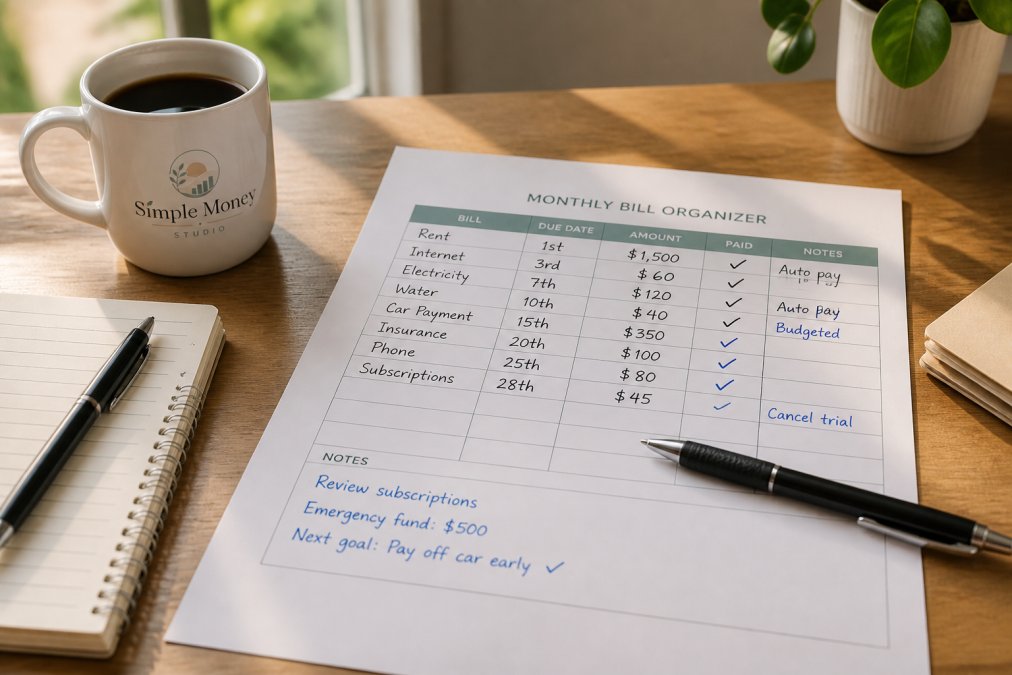
A monthly bill organizer printable is a paper or digital worksheet that keeps your income, bills, due dates, and payment status in one place. It works because it's visible, simple, and needs no app login.
Overcoming the Mental Block of Bill Tracking
Avoidance is the real reason most bill tracking fails. Opening a bill you're afraid of feels bad, so you don't, then the pile grows, and the pile itself becomes the reason not to look.
A few ways to get past the block:
- Open one bill, not all of them
- Write down what you owe without judging the number
- Give each bill one action: pay it, call about it, or cancel it
- Track one small win each month to build momentum
- Accept that the first month will be messy
Conclusion
The hardest part of tracking bills isn't the math, it's building a routine simple enough to keep going when life gets busy.
Frequently Asked Questions
What is the best app for tracking monthly bills?
The best app depends on your needs. Many people prefer a simple spreadsheet or a printable monthly bill organizer because they offer full control and no subscription fees. If you want automation, look for apps with account synchronization and payment reminders. However, for those who feel overwhelmed by complex apps, a paper-based system like the Money & Bills Organizer provides a calm, straightforward way to track due dates and payments without digital distractions.
How can I organize my bills to ensure I never miss a payment?
Set up a weekly check-in routine. Use a bill calendar to mark due dates and paydays, and list all recurring expenses in one place. Automate fixed payments where possible, but still review your account statements monthly. A printable tracker like the Money & Bills Organizer helps you see what's due, what's paid, and what still needs attention. This simple habit takes about five minutes a week and prevents late fees.
Should I use a digital tracker or a printable budget planner?
Both have merits. Digital tools offer automation and reminders, while printable planners give you a tangible, distraction-free way to engage with your money. If you struggle with consistency or feel overwhelmed by apps, a printable monthly bill organizer can be more effective because it's simple and always visible. Many people combine both: automate payments digitally but track everything on paper for clarity. The key is choosing a system you'll actually use.
How do I budget for irregular monthly bills?
Start by listing all irregular expenses, like annual insurance premiums or quarterly taxes. Divide the total by 12 to find a monthly set-aside amount. Use a separate savings account for these funds. A budgeting for irregular monthly bills approach also involves prioritizing needs over wants during lean months. The 1-Hour Budget Setup Guide helps you plan ahead without stress.